
A calmer phone for your parents
A phone your parent can just pick up and use.
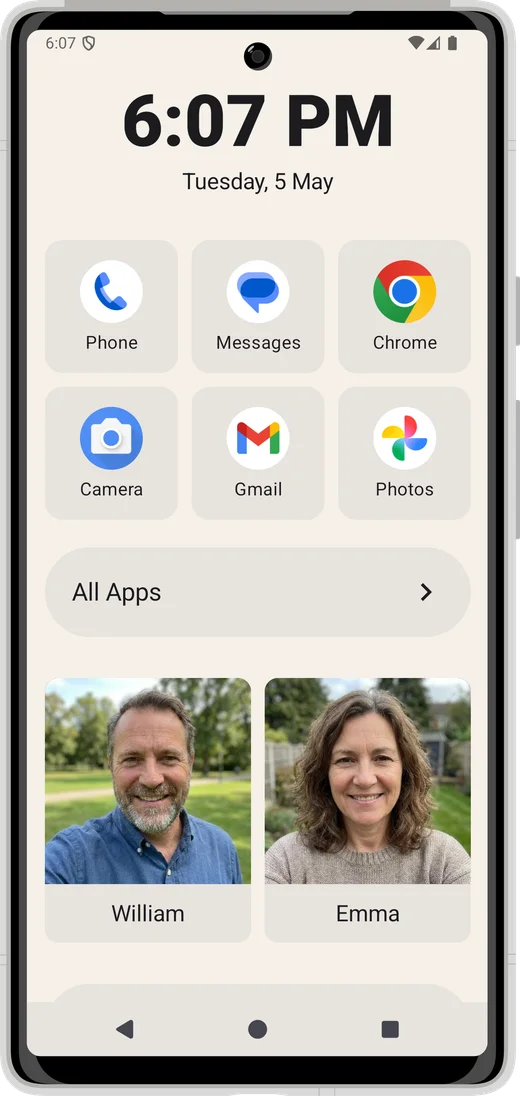
Smartphones are too complicated
Modern smartphones are remarkable — but for many elderly people, they're exhausting. Small icons, endless notifications, confusing menus, and apps that seem to rearrange themselves.
The result? Your parent calls you with the same questions. You worry when they go quiet. And they feel embarrassed that something so simple feels so hard.
It's not them. The phones aren't designed for them. That's why more and more families are turning to a dedicated senior home app — a simpler front door to Android. Inglenook is exactly that.
Everything they need. Nothing they don't.
Large, clear tiles
A small grid of the apps your parent actually uses — each one big enough to tap with confidence. Nothing hidden, nothing to accidentally delete.
Call family in one tap
The people your parent calls most live right on the home screen — name, face, one tap to ring. No menus, no searching, no wrong numbers.
Set up by you, used by them
You configure it once — choose the apps, pin the contacts, set the layout. Then hand it over. Inglenook stays exactly as you left it.
Fully customisable
Choose which apps appear, set family contacts, and adjust the layout. You're in control — not the phone.
Up and running in minutes
No technical expertise required.
Install Inglenook
Download it free from the Google Play Store.
Set it as the Android home app
A quick, guided prompt walks you through this — it takes about 30 seconds.
Add contacts and apps
Choose which apps appear and add the family contacts your parent calls most.
I built Inglenook for my mum, who has multiple sclerosis and finds her phone increasingly difficult to use. Watching her pick it up and just use it — without asking for help — is exactly what I hoped for.
Give your parent a simpler phone today
Free to download. Five minutes to set up. No subscriptions, no accounts — just a phone that works for them.