A simpler Android home screen for older adults
Inglenook is an Android home app designed for seniors and older adults. It replaces the cluttered home screen with large, easy-to-tap tiles, favourite contacts one tap away, and nothing else to worry about.

Free to download · Works on any Android phone · Takes 5 minutes to set up
- No account, no subscription, no hidden fees. Inglenook is permanently free.
- Works on any Android phone your parent already owns.
- Set up by you. Used by them. They will never need to touch a setting.
See it for yourself
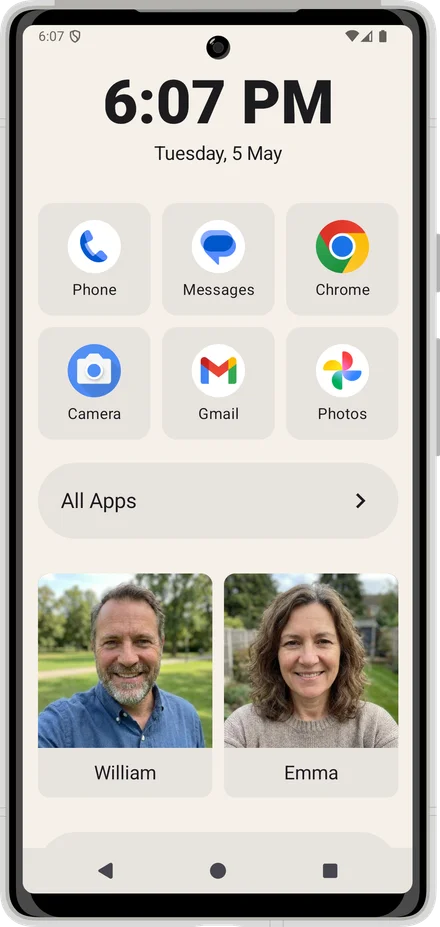
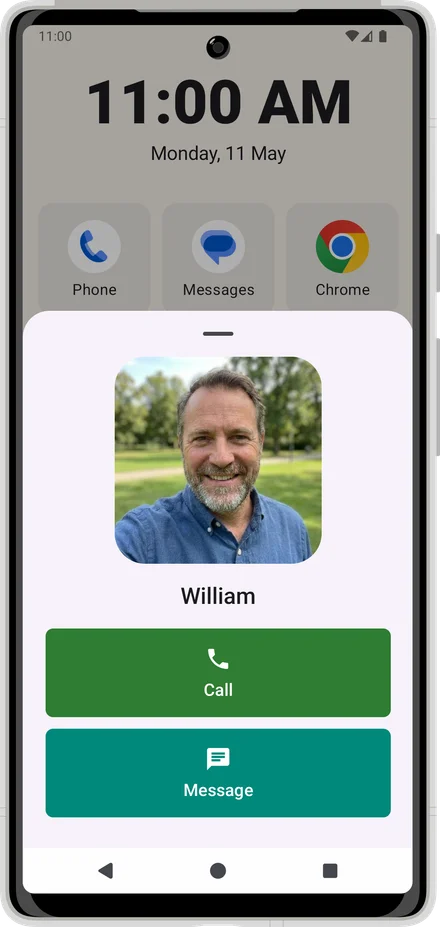
Everything they need. Nothing they don't.
Large, clear tiles
A grid of large app icons sized for confident tapping, even with shaky hands or reduced vision. No tiny targets, no squinting.
Family contacts front and centre
Pin Mum, Dad, or the doctor — with their photo — one tap to call.
Set it and forget it
You configure it once. Your parent never sees a settings screen.
Any Android phone
No new hardware needed. Inglenook is Android for seniors who want simplicity without a new device. Works on the phone they already have.
Common questions
- What is an easy phone for seniors?
- An easy phone for seniors is usually an ordinary Android phone with a simplified home app installed — one that shows only the apps and contacts they actually use, with large tiles and no confusing menus. You do not need to buy a special senior phone; any Android phone can be made simpler with the right home app.
- How do I make an Android phone easier for an elderly parent?
- The single most effective change is replacing the home screen with a simpler one. Install a home app like Inglenook, pin the four or five apps they actually use, add photo tiles for the family members they call most, and turn up the display size in Android settings. That is usually enough.
- Does Inglenook work on any Android phone?
- Yes. Inglenook works on any Android phone running Android 8.0 or later. No new device is needed.
- How big are the icons in Inglenook?
- Inglenook uses a large-icon grid — significantly bigger than the standard Android home screen. The grid shows at most four to six apps per screen, making each tile easy to tap even with shaky hands or reduced vision.
- Is Inglenook free?
- Yes. Inglenook is free to download from the Google Play Store. There is no subscription, no account required, and no in-app purchases.
Give your parent a calmer phone today
Free to download. Five minutes to set up. No accounts, no subscriptions — just a phone that works for them.