
Inglenook Launches Android Home App Built for Older Adults
A simplified home screen designed to make everyday phone use clearer, calmer, and more connected — available now on Google Play.
EDINBURGH, 4 MAY 2026 — Inglenook today launched its first Android home app, a purpose-built replacement for the standard Android home screen aimed at older adults who find conventional smartphone interfaces difficult to navigate. The app is available now on Google Play.
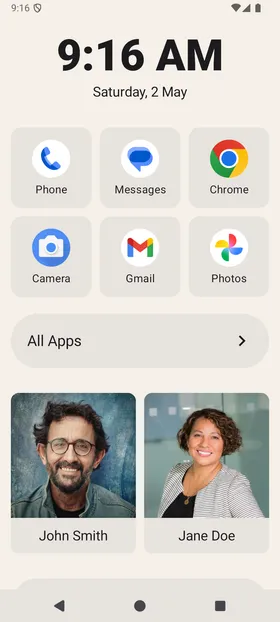
Inglenook replaces the default Android home screen with a focused layout: a clock, a grid of favourite apps, and a strip of pinned contacts. The design removes the visual clutter common to stock Android while preserving full access to installed apps through a searchable all-apps screen.
The app is aimed primarily at older adults who use their phones for a limited set of tasks — calls, messages, and a handful of apps — but are slowed down or frustrated by interfaces designed for a much broader range of interactions. Family members and carers are the expected primary installers, setting up Inglenook on a parent or relative’s device.
Contacts at the centre
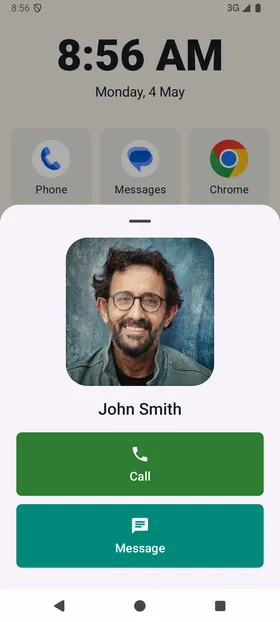
A central design decision in Inglenook is the prominence of the contacts panel. Rather than requiring users to open a dialler or contacts app, Inglenook surfaces a two-column grid of pinned contacts directly on the home screen. Tapping a contact places a call immediately, with the required system permissions handled at first use. A contact detail sheet provides a larger photo and additional options without navigating away from the home screen context.
Setup guided by onboarding
Inglenook includes a six-step onboarding flow that walks new users — or the family member setting up the device — through adding favourite apps, pinning contacts, and setting Inglenook as the default home app. Default launcher detection is automatic: the onboarding advances without manual steps once the change is confirmed in Android settings.
Display and accessibility controls
The settings panel covers background type and colour, theme mode, high-contrast display, and text size — the last of which links directly to Android’s system accessibility settings rather than duplicating them. Contact and app grid columns are configurable. All interactive elements include haptic feedback.
“I built Inglenook for my mum, who has multiple sclerosis and finds her phone increasingly difficult to use,” said Edward Harker, who built Inglenook. “I wanted her to be able to call us without having to think about it. Watching her pick it up and just use it — without asking for help — is exactly what I hoped for.”
Inglenook is free to download and is available now on Google Play.
About Inglenook
Inglenook makes Android home apps for older adults and the families who support them. The app replaces the standard Android home screen with a calm, focused interface built around calls, contacts, and everyday apps. More information is available at inglenook.app.
Try Inglenook free
A simpler Android home screen for older adults. Takes five minutes to set up.